Live Stream or On-Demand: Choose by How You Want to Participate
Live stream or on-demand playback changes how you join in, pause and replay. Compare chat, playback controls and shared viewing to choose the right fit.
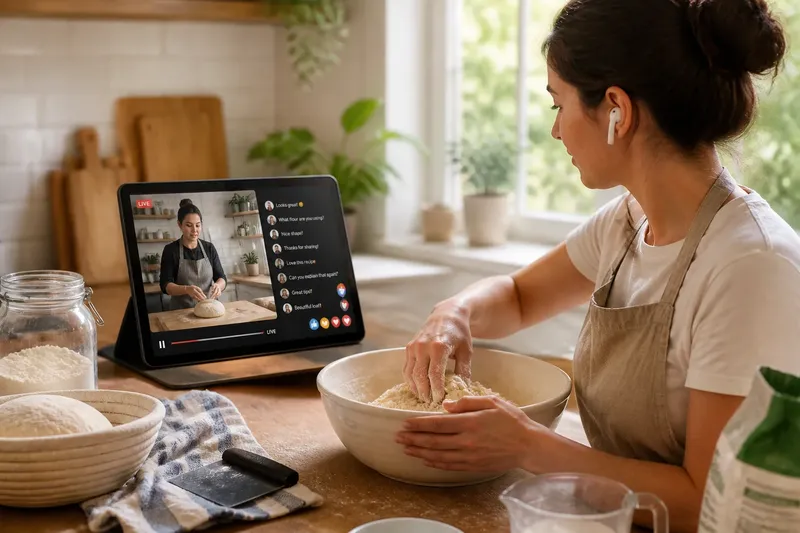
Should you join a live stream or choose on-demand playback? The difference is not just when the video starts: it is how you can participate, steer the player and follow along with other viewers. A live chat can turn a cooking demonstration into a conversation; a replay can let you focus on the chef’s hands without missing a step.
Think of the player as a remote control for your attention. Live streams may offer a narrow set of controls while an event unfolds, whereas on-demand playback usually lets you pause and revisit available moments. The precise options depend on the service and programme.
What can you do during a live stream?
A live stream arrives as an event is taking place. Depending on the service, you might be able to post in a chat, send reactions, answer a poll or simply watch alongside an audience. Those features make participation part of the format, not an extra you have to add yourself.
Interaction can also divide your attention. If the chat scrolls quickly, you may need to choose between reading comments and watching the video. Some players let you hide the chat or switch it off; others offer fewer options, so check the viewing screen before settling in.
Playback controls vary too. A live player might let you pause or rewind, but doing so can leave you behind the current stream. If you want to stay aligned with the discussion, check whether the player has a “live” button or another way to jump back to the current point.
How does on-demand playback change your control?
On-demand playback lets you start a programme yourself and, where supported, pause, resume, rewind or skip. That makes it easier to inspect a detail, catch dialogue you missed or stop when someone needs your attention. Not every title offers the same controls, and availability can be limited by the service.
These controls change how you take part. You can pause a tutorial to try a technique, then resume when you are ready; you can also share a scene with someone without worrying that the stream will move on. The trade-off is that you are no longer responding to the same moment as viewers following a live event.
On-demand does not mean a title will always be there. A programme may have a viewing window, appear only as selected episodes, or be unavailable for replay. Check the title page if you are planning to return to it later.
Which format fits the way you want to join in?
Start with the kind of participation you want, then check whether the player supports it. Use these checks to make a concrete choice:
- Check for a live chat or reaction panel. If conversation is part of the appeal and the stream provides it, choose live; if the panel is absent or distracting, watch without it or choose on-demand if available.
- Check whether chat can be hidden. If you can close it and want an uncluttered picture, keep the live stream and hide the panel; if you cannot and comments pull your attention away, choose a replay or another viewing option.
- Check the live player’s pause and rewind controls. If they work and you are comfortable falling behind, use them when interrupted; if staying in sync matters, keep watching live or wait for a replay.
- Check whether the player has a return-to-live control. If it can bring you back to the current stream, use it after rewinding; if not, decide whether to stay behind or restart at the live point if the player allows it.
- Check whether the on-demand player supports pause and resume. If it does, use it for a stop-start session; if it does not, choose a viewing time when you can stay with the programme or use another available format.
- Check whether the title can be rewound or replayed. If it can, revisit a passage you missed; if it cannot, slow down your viewing by pausing where supported or choose a version with replay controls.
- Check for a programme listing that says a replay will be available. If it will, watch later when participation is less important; if it will not, join the live event or accept that the moment may not be available afterwards.
Imagine you want to follow a live bread-making demonstration, but you also plan to mix dough as the presenter works. You check the player and see that chat can be hidden, pausing is available, and rewinding leaves you behind the live point; the listing also says a replay will be available. You hide chat and watch live, pausing to mix when needed. When you realise you missed a shaping detail, you choose not to rewind and lose the shared moment; instead, you plan to revisit that section in the replay. The trade-off is clear: live participation now, closer control over the technique later.
What should you check about chat, pausing and replay?
Can I hide live chat without leaving the stream?
That depends on the player. Look for a chat toggle or a layout setting; if there is none, you may need to watch without opening the chat or use a replay that has no live conversation.
Will pausing a live stream keep me in sync?
Not necessarily. Pausing can leave you behind the current event, so check for a return-to-live control if staying aligned with other viewers matters.
Can on-demand playback help me follow a tutorial?
It can, if the player lets you pause and revisit sections. Check the available controls first, then use them to match the demonstration’s pace to your own.
Will I be able to watch the live event later?
Only if the service makes a replay or recording available. Check the programme listing rather than assuming a live stream will remain accessible afterwards.
How do you settle on a format?
Ask whether you want to contribute to the event as it happens or control the playback to suit your attention. If chat, polls or shared reactions are central, a live stream may fit; if you need to pause, repeat or work through the material at your own pace, on-demand playback may serve you better.
The phrase live stream or on-demand is most useful when treated as a question about participation and player controls, not a contest between formats. Check the actual chat, pause, rewind and replay options for the programme you want, then choose the trade-off you are happy to make.
If a live session offers interaction but limited replay, decide in advance which matters more: joining in now or catching every detail. That small choice can keep the player’s controls from becoming a distraction once the event begins.