The Autoplay Assumption: When the Next Episode Is Not the Best Next Choice
Autoplay can make a viewing session feel effortless. Learn how to use episode endings as a pause for choosing what suits your attention and evening.
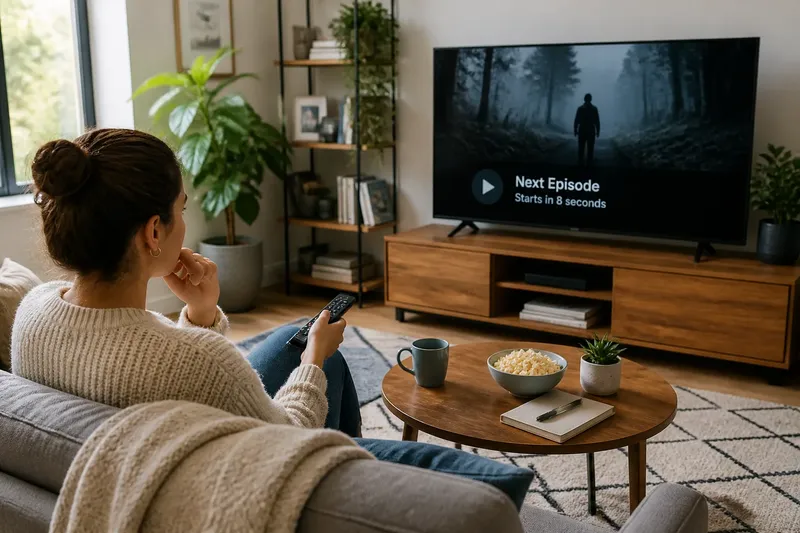
Autoplay makes the next episode of a series begin before you have quite left the previous one. That small handover can feel like a helpful convenience, but it also turns a viewing decision into the default. The next episode is available; whether it is the best next choice is a separate question.
For streaming viewers, the useful distinction is between a story continuing and a session continuing. A series may be designed to pull you onward, yet your attention, company or plans may have changed since you pressed play. Treating the end of an episode as a natural decision point gives you a chance to notice that difference.
What does autoplay decide for you?
Autoplay is a playback setting that starts another episode or item after the current one ends, usually after a brief transition. Depending on the service and device, it may be possible to turn it off in account settings or a playback menu. Its immediate job is to remove the need to select the next episode yourself.
That convenience can blur the boundary between finishing one episode and choosing another. The opening credits or recap of the next instalment may arrive while you are still thinking about the ending. At that point, continuing can feel less like a choice than simply allowing the interface to carry on.
This does not mean autoplay is inherently unwelcome. If you have set aside an evening for a series, uninterrupted playback may suit you. The point is to recognise that a setting shapes the moment of choice: it can make continuation easy without making continuation right for every occasion.
Why is an episode ending a useful pause?
Episode endings often provide a natural seam. The immediate plot has reached a stopping point, even if a cliffhanger leaves a question hanging. That seam is much like putting down a book at the end of a chapter: the next page is ready, but you still get to decide whether to read it now.
A pause can help you check what kind of attention the next episode is likely to ask for. A tense drama may call for concentration, while a familiar comedy may work better as relaxed company. You might be watching with someone else, or have started a series because it suited the mood earlier in the evening. The end of an episode lets those circumstances catch up with the story.
There is also a difference between wanting to know what happens next and having the appetite to watch it now. Curiosity can be a reason to continue, but it need not settle the question. Saving the next instalment for a more attentive moment may make it easier to follow the details you care about.
How can you choose without turning viewing into a chore?
You do not need a formal rule or a careful audit of your screen time. A brief, ordinary check is enough: am I still enjoying this, do I want another episode now, and does continuing fit the rest of my evening? If the answer is unclear, pausing is a choice rather than a failure to finish.
Say you have just reached the end of a mystery episode while sharing the sofa with a friend who has become quiet and distracted. You pause playback and ask whether they would rather continue or stop there; if they choose to stop, the observable result is that the evening ends at a point you both agreed on, rather than with another episode already under way. If you are watching alone, the same pause can make space to choose deliberately without needing to justify the choice.
Some viewers prefer to disable autoplay so that the next episode does not start automatically. Others leave it on but use the end screen as a prompt to decide. Either approach can work; the useful choice is the one that makes your viewing feel intentional rather than dictated by a countdown.
What should you ask at the end of an episode?
Does autoplay start the next episode automatically?
Usually, autoplay is designed to begin the next available episode after the current one, though the exact behaviour varies by service and device. Check the playback or account settings if you want to know which controls are available to you.
Can you stop autoplay on a streaming service?
Many services offer an autoplay control, often in profile settings or playback preferences. The setting may apply differently across devices, so look at the options on the screen you use rather than assuming one change affects every device.
Is it better to turn autoplay off?
There is no single best setting for every viewer. Turning it off creates a clear selection point, while leaving it on can make planned viewing easier; you can choose based on whether the automatic handover helps or distracts you.
How do you know whether to watch another episode?
Ask whether you still want the story, whether you have the attention for it, and whether continuing suits the people and plans around you. If those answers point in different directions, stopping at the episode boundary is a reasonable way to leave the decision open.
When does continuing make sense?
Sometimes the next episode is exactly what you want. You may be following a plot that depends on closely connected instalments, or watching with others who have agreed to continue. A deliberate choice to carry on can make for a satisfying session; it simply differs from being carried forward by a default.
It can also help to decide your stopping point before pressing play, especially if you have a commitment later. That need not mean setting a strict episode limit. It can be as simple as knowing that you want time for one instalment, then using its ending to check whether the plan still suits you.
The autoplay assumption is that a finished episode naturally leads to another. In practice, the boundary is valuable precisely because it gives you a moment to choose: continue, pause, or come back when the next episode has your attention. Autoplay next episode settings can make playback smoother, but a smoother handover is not the same as a better viewing session.